It’s been over a month since my last post, and a lot has happened in that time, both in the AI text generation world and in the broader financial system. Silicon Valley Bank’s troubles and related contagion are topics close to my previous professional and educational background, and I have a few opinions on that. But today, I’ll focus on sharing an example of how I’ve been using GPT recently.
- ChatGPT as a Coding Aid
- Some early fails
- GPT-3.5 vs GPT-4
- What is the main limitation? (context)
- What else is there?
- Conclusion
ChatGPT as a Coding Aid
For me, the primary use case has been coding. Not for work, but to revive old personal projects that I had abandoned, and to start some new ones.
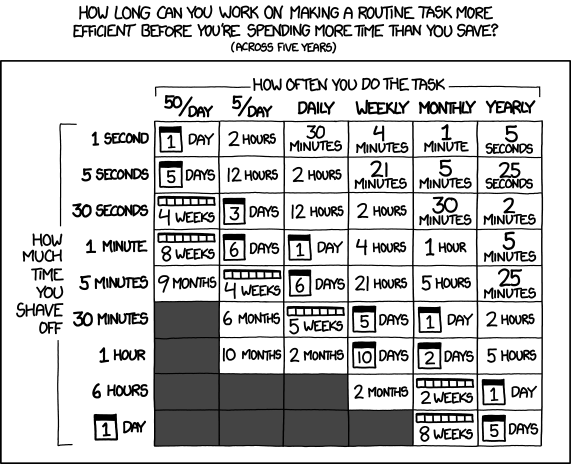
As a tech enthusiast with some coding ability, I often come up with ideas for doing something “cool” by connecting applications (directly, through APIs or data dumps) and creating quirky automations (like asking Alexa when my bus is coming, connecting to London’s TfL APIs, or checking for a list of items I’d like to buy when their prices drop, etc.). In general, these projects are more about enjoyment and learning than precise effort-saving or time efficiency, as demonstrated by the ever-relevant xkcd comic:
However, most projects typically evolve until the technical challenges become either quite daunting or too specific to a technology that I don’t have a strong desire to learn and master.
Enter ChatGPT, which I’ve been using to revive stale projects and overcome those roadblocks (not always on the first try). I’ve also started new projects that I would have previously discarded due to some trade-off calculation. Moreover, using and learning how to effectively employ LLMs is an interesting activity in its own right.
Additionally, I’ve been focusing on improving the architecture of my projects. I’ve long been aware of software patterns (like those from “the gang of four”, as well as more general system/application-wide patterns such as Onion and Hexagonal -ports and adapters-) and good practice standards (Clean Coding, SOLID principles, etc.). I typically struggled to implement these because I spent more time on the “business logic” of those projects, which eventually stagnated.
With ChatGPT, I’ve been able to start implementing some of these good practices and also begun using tools that facilitate them. For instance, I usually work in Python, well-known for being a dynamic scripting language and not an ideal match for typical patterns. However, by using specific tools related to defining types (type hints, mypy, pydantic), you can create code that’s easier to make compatible with standard patterns (on the other end of the spectrum, patterns work very well with Java and its static, strictly typed, class-based approach).
Some early fails
One of the first things I tried coding-wise with ChatGPT was generating a very specific application in different languages. I wanted a simple web server that would reply “pong” or add 2 to a provided number and could be deployed with Docker.
I started with languages outside the top 5-10, and the results weren’t great. I tried Racket (a modern, education-oriented LISP), Lua, and Rust. I chose a Docker-ready project to avoid installing specific IDEs or dealing with local configurations. While perhaps not a ‘fair’ test for GPT, I liked the scope. When I moved to JavaScript and Python, the results were almost flawless and immediate. My conclusion was that ChatGPT performs better with these latter languages because they are more popular, and thus there is more online content used to train the GPT models.
On a side note, my experience with Java was mixed; I had expected it to go as smoothly as Python or JavaScript, but I suppose the Java Virtual Machine added some complexity. Additionally, using TypeScript instead of JavaScript wasn’t as effective, but that’s because you need to transpile it to JavaScript, adding an extra step that wasn’t a fair comparison with the other languages.
In the end, I didn’t push this exercise too far; it was just a way to get my feet wet.
GPT-3.5 vs GPT-4
Initial Thoughts and Subscription Choices
When ChatGPT+ launched at $20/month, I didn’t immediately sign up. By the time Bing was up and running, the lack of capacity for free ChatGPT was no longer an issue. As free ChatGPT capacity continued to be available in the following weeks, my incentive to subscribe dwindled. Bing wasn’t as good for coding, but I managed.
When OpenAI launched the gpt3.5-turbo API at a significantly cheaper rate than previous models, I began to experiment with it, providing my credit card for API usage but without the monthly fee.
However, when GPT-4 was released exclusively for ChatGPT+, that was the final push I needed to subscribe. This gave me two main options:
- Use the “old” GPT-3.5, but faster than what’s available without the subscription
- Use GPT-4, which is slower but with better capabilities and some usage caps (currently 25 messages every 3 hours, down from an initial 100 every 4 hours, I think; I don’t expect this to be a significant issue in the coming weeks/months).
For this “coding aide” use case, I tried both options. For many tasks, I really appreciate the low latency of ChatGPT 3.5, as it disrupts my flow less. A key advantage of using GPT for code is that you can often validate the output by using it in your project. This contrasts with asking factual questions, where hallucinations can be harder to spot if you’re not knowledgeable about the topic.
I haven’t found GPT-4 to be a massive leap over 3.5, although many people claim otherwise. Lately, I’ve been asking GPT-4 for help more often, and just yesterday, I encountered a case where GPT-3.5 couldn’t solve a coding problem, but GPT-4 could. For reference, I had a Python web server built with asyncio/uvicorn and wanted to add a non-blocking task that would run every ~5 minutes or so.
Impact on coding effectiveness
Another great aspect of GPT for code is that not only can you quickly receive feedback from a code failure, but you can also copy and paste the error, and ChatGPT will often correct itself.
A word of caution here: you can still get working code that’s wrong for various reasons. That’s why I see the tool in its current form as a capability expansion rather than a replacement. In my case, I’m aware of many of my coding limitations, but I also have some solid foundations that are helpful.
There have been a few examples on Twitter of non-coders demonstrating how they were able to achieve things in 30 minutes using ChatGPT. While these are nice examples, I don’t think they represent the majority of situations.
I’m also sceptical of the claimed “10x” improvements in productivity, especially for a relatively mature development team. For one thing, delivering software involves more than just coding. Moreover, production-grade code for large systems is challenging and often specific, and I don’t think the current GPTs are quite there yet.
I do believe (and I’m not the only one, as many have said) that it’s excellent for creating and accelerating prototypes and proofs of concept.
What is the main limitation? (context)
The GPT-3 family was launched with a 2k token window. As a rule of thumb, this equates to around 1.5k words, which is approximately 7-8 minutes of reading time or 6-7 pages in a fiction book.
The issue arises when, after a long enough conversation, GPT loses awareness of everything that has been discussed, which can often be a hindrance.
The same applies to code; it’s difficult for ChatGPT to be aware of an entire project’s structure. In my case, I found this limitation actually had a positive side, as it forced me to organise my code into separate modules, each with proper names and just a few lines of code (1-3 classes, 1-2 loose functions/methods). I would often export the overall project folder structure. By using common concepts (like patterns), I feel this helps ChatGPT infer context more effectively. It doesn’t exactly make inferences, but it assumes certain things exist and can be used, and it’s often right or only slightly off, making it easy to correct.
With GPT-4, new longer context windows have been introduced. A 32k window (equivalent to 24k words or ~100 pages) is now available, albeit only for API use. It comes with the highest cost per token so far: $0.06 per 1k tokens in the prompt and $0.12 per 1k tokens in the response. A full 32k context prompt would cost $2, and if you receive an 8k token response, that’s an additional $1. While the value of this can be immense, it doesn’t scale well for providing your end-users with numerous queries.
An interesting aspect of context that I haven’t fully explored yet is that, in Python, for example, whitespace (spaces and tabs) has some significance and counts as tokens (for prompt cap and cost calculations). I haven’t tried removing whitespace to see if it yields a similar quality output (which should also be correctly formatted with whitespaces for easy copy-pasting). Intriguingly, Bing actually removes whitespaces when you copy and paste your code (and responds, when it’s willing to, with properly formatted code).
What else is there?
GitHub Copilot?
I’m not sure, as I haven’t tried it yet. I was an early tester many months ago, but I didn’t use it enough. Since I don’t spend most of my time coding, I didn’t think it was worth getting the subscription just yet. I have installed a free service/plugin called Codeium, which sometimes provides useful autocompletions, but for now, it’s just a nice little toy.
ChatGPT plugins?
I’m not sure, as I haven’t been given access just yet. This week, I gained API access to GPT-4, though I don’t have an immediate use case I’d like to try it on, at least not high up in the pipeline. Looking forward to testing plugins soon!
Conclusion
Getting help from chatGPT for coding is a great use case, specially for saving time on boilerplate code, and also to get up to speed quickly with things you don’t have full knowledge. It’s good to treat the input as suggestions coming from someone with a lot of excitement but limited context, and you should be driving the decisions (most of the time?).


 juan M
Leave a reply to Chat GPT for coding personal projects – an example – juan M Cancel reply